

Hiding File Extensions in windows is a some settings which one need to toggle on and off, as sometimes it is necessary to see the file extension to recognize the file and program which can open the same in windows.
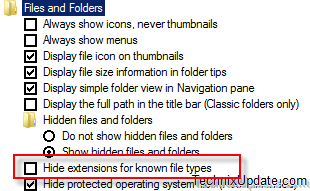
But turning the setting of hide extensions for known files types on or off, you will need to manually open the windows explorer go to File Menu >> Tools >> Folder Options and then click the view tab and under view tab you will need to locate the setting which says hide extensions for known files types
Rather, avoiding this whole tedious process you can install a free shell extension which will work on xp, vista and windows 7 also. This shell extension is called FileExtToggle.
FileExtToggle add a right click context menu entry to your right click context menu that appears on the desktop and folder backgrounds. This option lets you toggle the display of file extension on and off in windows.
Download FileExtToggle


No comments:
Post a Comment