

Recently I noticed a new tray icon after restoring my laptop. This small system tray icon belongs to synaptics touchpad fitted on your laptop.

You can simply hide this tray icon of synaptics touchpad to save space in your system tray and reduce the number of icons shown in taskbar tray area in windows.
Here is how to hide the tray icon of synaptics touchpad
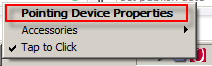
1. Right click the tray icon of synaptics touchpad and select Pointing Device Properties

2. Now the synaptics device properties will open up, click the Device Settings Tab

3. Click the radio button which says, Remove icon from taskbar and click OK button.
4. That’s the synaptics device drive icon will disappear in taskbar system tray.

You can simply hide this tray icon of synaptics touchpad to save space in your system tray and reduce the number of icons shown in taskbar tray area in windows.
Here is how to hide the tray icon of synaptics touchpad
1. Right click the tray icon of synaptics touchpad and select Pointing Device Properties
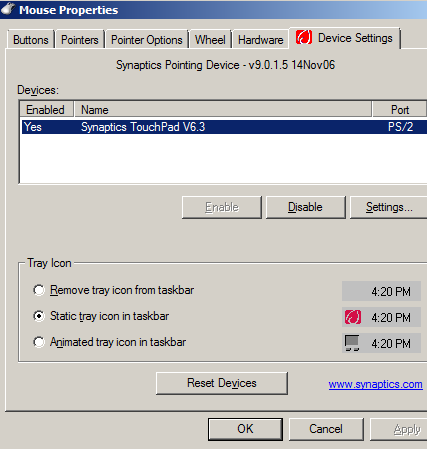
3. Click the radio button which says, Remove icon from taskbar and click OK button.
4. That’s the synaptics device drive icon will disappear in taskbar system tray.


No comments:
Post a Comment